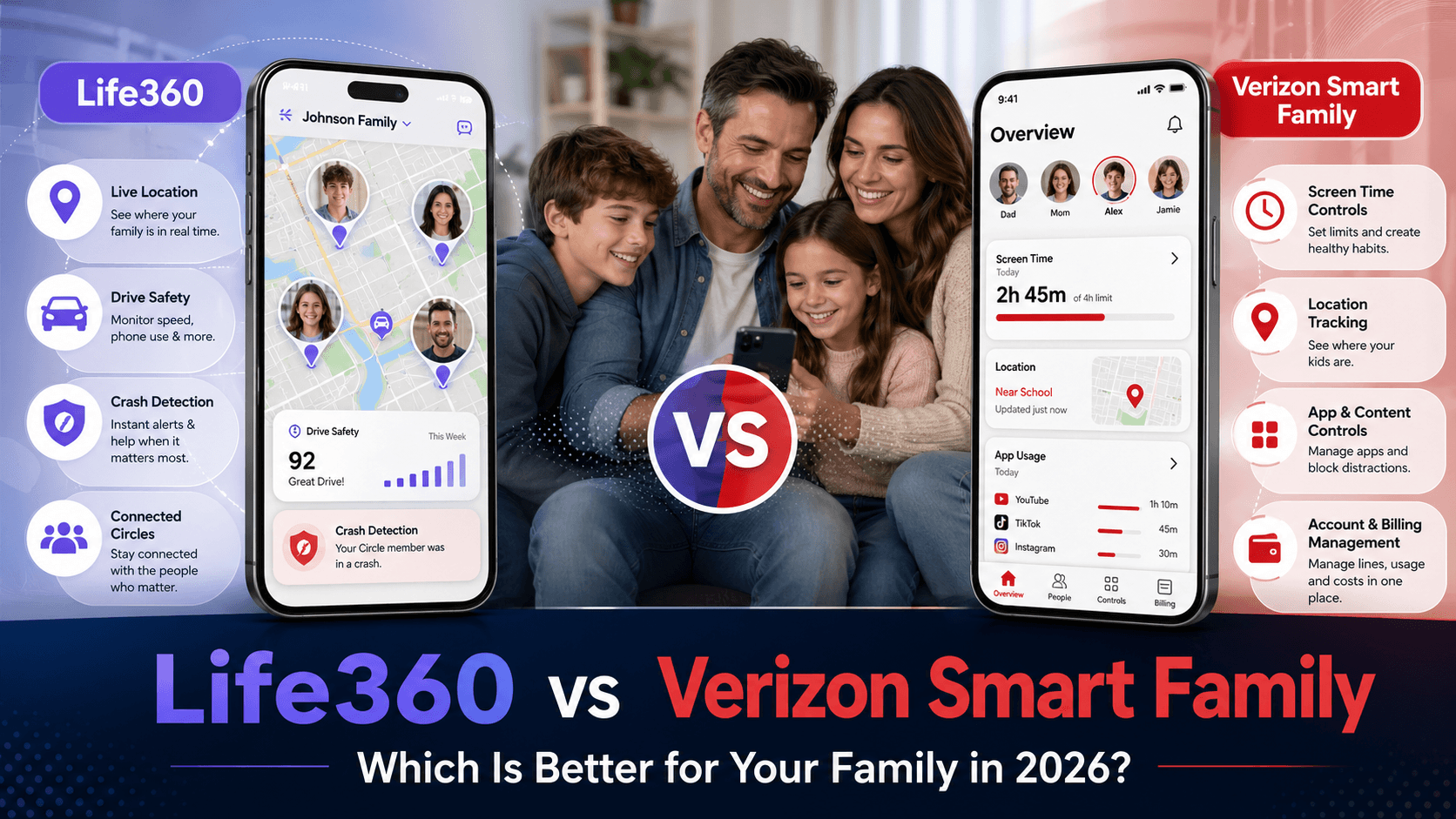

Choosing the right family safety app can feel overwhelming, especially when you are comparing popular options like Life360 vs Verizon Smart Family. Parents want real-time location tracking, reliable alerts, and enough parental controls to keep their kids safe—without turning everyday life into surveillance.
In this in‑depth guide, you will learn how Life360 and Verizon Smart Family actually work, how much they cost, which features matter most, and which one is the better choice for your family in 2026.
Quick Summary: Life360 vs Verizon Smart Family
If you are in a hurry, here is the short answer.
- Choose Life360 if:
- Your family members use different carriers or live in different regions
- You care most about precise location tracking, driving safety reports, and emergency assistance
- You want a dedicated family safety app that works beyond one mobile carrier
- Choose Verizon Smart Family if:
- Everyone in your household is already on Verizon
- You want stronger parental controls like content filters, app blocking, and screen‑time limits
- You prefer to manage your kids’ phones directly from your carrier account
For many families, Life360 is the better fit for cross‑carrier location sharing and driving safety, while Verizon Smart Family is stronger if your main priority is parental control inside the Verizon ecosystem.
What Is Life360?
Life360 is a standalone family safety app designed to help families stay connected and safe. After installing the app on each family member’s phone, you create a private “Circle” where everyone can see each other’s real‑time location on a map.
The app focuses on three main areas:
- Location sharing and geofencing
- Real‑time GPS location for each family member
- Customizable “Places” such as home, school, or work
- Automatic notifications when someone arrives or leaves a saved place
- Driving safety insights (on paid plans)
- Trip history with routes and timestamps
- Driving behavior reports, including hard braking, rapid acceleration, and speeding
- Crash detection on supported plans, with automatic alerts and emergency assistance
- Emergency and safety features
- SOS alerts that send your location to chosen contacts
- Some plans include identity theft protection and roadside assistance
Unlike carrier‑based tools, Life360 works on most major mobile networks and supports both iOS and Android, making it flexible for blended or extended families.
What Is Verizon Smart Family?
Verizon Smart Family is Verizon’s own family safety and parental control service. It is built to help parents manage their kids’ smartphone usage and online safety directly through their Verizon account.
While it also offers location features, Verizon Smart Family’s strengths lie in parental controls:
- Location tracking
- View your child’s device location
- Get arrival and departure alerts for common places
- Some plans offer more frequent location updates
- Parental controls
- Block specific apps or websites
- Set content filters based on age or category
- Pause the internet or restrict data usage during certain hours
- Monitor call and text activity (on supported lines and plans)
- Deep carrier integration
- Works only with Verizon lines
- Controls can be managed from the Verizon app or via your account
- Billing is bundled with your existing Verizon plan
If your entire household uses Verizon and you want tighter control over how your children use their phones and data, Verizon Smart Family is designed for exactly that.
Feature Comparison: Life360 vs Verizon Smart Family
To make things easier, here is a side‑by‑side comparison of the key features.
Core Features Table
| Feature | Life360 | Verizon Smart Family |
|---|---|---|
| Real‑time location sharing | Yes, for all Circle members | Yes, for linked Verizon lines |
| Location history | Yes (more detailed on paid plans) | Limited, varies by plan |
| Geofencing alerts | Yes, customizable “Places” | Yes, for common locations |
| Driving behavior reports | Yes, on paid plans | Generally not as detailed |
| Crash detection | Available on higher‑tier plans | Not a core focus |
| SOS emergency alerts | Yes | Limited / not as central |
| App blocking | Very limited or not available | Yes, one of the main features |
| Web content filtering | Not the main focus | Yes, with categories and age filters |
| Screen‑time controls | Not a primary feature | Yes, can pause internet or schedule limits |
| Carrier‑independent | Yes, works on most major networks | No, requires Verizon |
| Platform support | iOS and Android | iOS and Android on Verizon lines |
From a pure family safety and location perspective, Life360 tends to offer more robust tracking and driving insights. From a parental control and phone‑usage management perspective, Verizon Smart Family is usually the stronger choice.
Location Tracking and Geofencing
Both tools provide live location tracking, but they do it in different ways.
Life360 Location Features
Life360 is built first and foremost around location:
- Smooth real‑time map view of all Circle members
- Detailed trip history, showing where each member has been and when
- Customizable geofences (“Places”) that trigger notifications when someone arrives or leaves
This makes Life360 especially useful for:
- Parents who want to know if kids arrived safely at school, practice, or a friend’s house
- Families with teen drivers, where trip logs and driving behavior matter
- Coordinating pickups and meetups across busy schedules
Verizon Smart Family Location Features
Verizon Smart Family offers location tracking as part of a larger parental‑control toolkit:
- View your child’s phone location on a map
- Get basic arrival and departure alerts for common locations
- Location update frequency can depend on the plan type and settings
Its location tracking is generally sufficient for many parents, but it often feels more “utility‑level” compared to the richer maps and trip histories in Life360. If fine‑grained driving data or frequent check‑ins are important to you, Life360 is usually the more powerful option.
Parental Controls and Online Safety
This is where the difference between Life360 vs Verizon Smart Family becomes very clear.
Life360 Parental Controls
Life360 focuses on safety and coordination rather than strict device control. It:
- Helps you see where your family members are
- Gives you insight into how they drive
- Helps you respond quickly in emergencies
However, it does not act like a full parental control suite. You typically cannot:
- Block specific apps or games
- Filter web content by category
- Enforce consistent screen‑time limits directly through the app
If you need these types of controls, you would usually pair Life360 with another parental‑control app or built‑in tools like Screen Time (iOS) or Family Link (Google).
Verizon Smart Family Parental Controls
Verizon Smart Family is much more comprehensive in this area. Depending on your plan and device, you can:
- Block individual apps and games on your child’s phone
- Restrict access to certain websites or content categories
- Set time‑based limits or pause internet access entirely
- Review call and text history to see who your child is communicating with
This makes Verizon Smart Family a better fit for parents who want both location awareness and strong control over how their kids use their devices and the internet.
Pricing and Plans
Prices change over time and may vary by country, app store, taxes, promotions, and carrier eligibility. Before subscribing, always check the latest price on the official Life360 website, the app store, or your Verizon account page.
Life360 Pricing
Life360 offers a free plan plus several paid membership tiers. The free version is enough for basic family location sharing, but paid plans are designed for families who want more history, more alerts, and stronger safety features.
In the U.S., Life360’s paid tiers are commonly structured as Silver, Gold, and Platinum. Life360’s own support page confirms that Silver, Gold, and Platinum add extra safety features for the user’s Circle, and memberships may auto-renew with taxes added depending on location.
Typical pricing structure:
| Plan | Best for | Typical features |
|---|---|---|
| Free | Basic location sharing | Real-time location sharing, limited place alerts, limited location history |
| Silver | Families who want more tracking history | Longer location history, more place alerts, basic safety upgrades |
| Gold | Families with teen drivers | 30-day location history, crash detection, roadside assistance, individual driver reports |
| Platinum | Families wanting maximum protection | Gold features plus stronger identity theft, stolen funds, travel, and emergency support features |
A useful way to explain Life360’s pricing is that it is usually family-oriented rather than line-by-line. One subscription can cover the Circle, which makes it more cost-effective for larger families than apps that charge per child or per device. This is one of Life360’s biggest pricing advantages if several family members need location sharing and safety alerts.
Verizon Smart Family / Verizon Family Pricing
Verizon’s family safety product has shifted from the older Verizon Smart Family branding toward Verizon Family and Verizon Family Plus. For current Verizon customers, this matters because the product is tied to the Verizon account rather than being a standalone app for everyone.
Verizon currently lists Verizon Family as available at no extra monthly cost for eligible postpaid customers, while Verizon Family Plus costs $14.99/month. Eligible myPlan customers may be able to add Verizon Family Plus as a $10/month perk, which Verizon describes as a $4.99/month savings.
Typical pricing structure:
| Plan | Best for | Typical features |
|---|---|---|
| Verizon Family | Existing Verizon customers who want basic monitoring | Location sharing, one location alert, Safe Walk/SOS alerts, call and text activity review |
| Verizon Family Plus | Parents who want stronger controls | Multiple location alerts, parental controls, screen-time tools, call/text blocking, family driving insights, roadside assistance |
| Verizon Family Plus Perk | Eligible Verizon myPlan customers | Similar Plus features at a discounted monthly perk price |
The key limitation is availability. Life360 can be used by families across different carriers and phone platforms, while Verizon Family is most useful if your household is already inside the Verizon ecosystem. If your family is already paying for Verizon, Verizon Family Plus may feel like a small add-on to an existing phone bill. If you are not a Verizon customer, Life360 is usually the more practical option.
Which Is Better Value?
For most families, Life360 offers better flexibility because it works independently of a wireless carrier and can cover mixed-device, mixed-carrier households. It is especially attractive for families who mainly want location sharing, driving safety, crash detection, and emergency support.
Verizon Family Plus offers better value for existing Verizon customers who want parental controls bundled into their phone account. It is less about being a universal family locator and more about managing a child’s phone use, screen time, call/text activity, and online access within the Verizon environment.
In simple terms: choose Life360 if you want a standalone family safety app; choose Verizon Family Plus if you are already on Verizon and want parental controls added directly to your phone plan.
Compatibility and Ease of Use
Life360 Compatibility
- Works on both iOS and Android
- Does not require a specific carrier
- Suitable for mixed networks, extended families, and co‑parenting scenarios
Because it is carrier‑independent, Life360 is easier to keep using even if someone switches mobile providers or travels internationally (within app limits and data coverage).
Verizon Smart Family Compatibility
- Requires Verizon mobile lines for full functionality
- Works with iOS and Android devices on those lines
- Best suited for families where parents manage all kids’ lines under one Verizon account
If one child or co‑parent is on a different carrier, Verizon Smart Family becomes less convenient or may not cover everyone you want to monitor.
Pros and Cons of Life360
Pros
- Strong, reliable real‑time location tracking
- Useful driving safety data for teen drivers
- Works across multiple carriers and countries (within coverage)
- Clear, simple app experience focused on safety and coordination
Cons
- Limited parental control features; not a full “device management” tool
- Some advanced features require higher‑tier paid plans
- Constant tracking can raise privacy concerns for older teens if not discussed openly
Pros and Cons of Verizon Smart Family
Pros
- Robust parental controls for apps, web content, and screen time
- Integrated directly into your Verizon account and billing
- Adequate location tracking for everyday check‑ins
- Good for parents who want more control rather than just visibility
Cons
- Only works properly if you are a Verizon customer
- Location tracking is generally less advanced than Life360
- Teens may feel heavily restricted if controls are overused
- If you switch carriers, you lose access to the service
Which Should You Choose: Life360 or Verizon Smart Family?
When comparing Life360 vs Verizon Smart Family, start by asking what you care about most.
Choose Life360 if:
- Your family uses different carriers or you expect to change providers
- You need accurate, always‑on location sharing and driving safety reporting
- You want a safety‑first app that helps everyone stay connected and informed
- You are willing to handle parental controls with other tools if needed
Choose Verizon Smart Family if:
- Everyone in your household is on Verizon
- You want strong parental controls from a single dashboard
- You want to restrict apps, websites, or screen time in addition to tracking location
- You prefer to manage your kids’ phones and safety tools through your carrier
Some families even choose to combine tools—using Life360 for rich location and driving data, plus either Verizon Smart Family or another parental‑control app for content and screen‑time management.
FAQ: Life360 vs Verizon Smart Family
Is Life360 better than Verizon Smart Family for location tracking?
In most cases, yes. Life360 usually offers more detailed trip history, smoother real‑time tracking, and driving behavior insights, which makes it stronger if location and driving safety are your top priorities.
Is Verizon Smart Family better for parental controls?
Yes. Verizon Smart Family typically offers more powerful tools to block apps, filter content, limit screen time, and monitor calls and texts, making it better suited for strict parental control.
Can Verizon Smart Family be used without Verizon service?
No. Verizon Smart Family is tied to Verizon mobile lines. If your family members are on different carriers, you will not be able to protect everyone using this service alone.
Does Life360 work if my child turns off location services?
If location services or mobile data are disabled on the device, any tracking app will lose accuracy or stop updating. The best approach is to combine technology with clear family rules and open conversations about safety and privacy.
Which is cheaper, Life360 or Verizon Smart Family?
It depends on your existing setup and the plan you choose. Life360 has a free tier and paid options with more safety features, while Verizon Smart Family is a paid add‑on to your Verizon bill. Always compare current prices and consider how many lines or family members you need to cover.